A Guide to Google’s Best Practices for Website Development to Increase Ranking
A website that ranks on Google’s first page and converts visitors into clients relies on more than just keywords or aesthetics; its success is determined by the architecture beneath the...
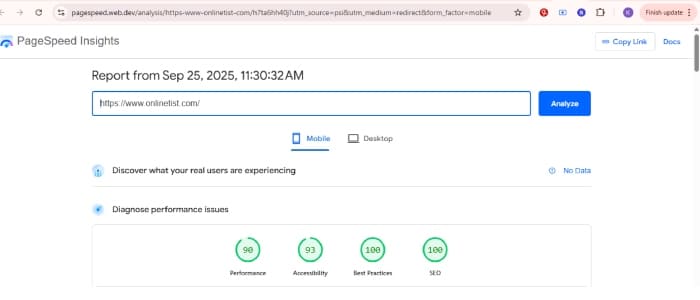
Proof of Performance: Achieving top scores on Google PageSpeed Insights for mobile.
A website that ranks on Google’s first page and converts visitors into clients relies on more than just keywords or aesthetics; its success is determined by the architecture beneath the surface.
A high-performing website is built on a foundation of solid engineering, intuitive user experience (UX), and uncompromising accessibility. It is an asset engineered to earn the trust of both Google’s algorithm and the people who use it. This guide breaks down that architecture, detailing the essential principles for website development that is not only live but is technically prepared for advanced off-page strategies and achieving high search rankings.
2. Foundational Web Development Principles
Before you can think about colors or content, you need strong bones. A proper foundation is the first step in any good website planning process and ensures your site is fast, reliable, and ready to scale.
Clean, Maintainable Code Structure
Use modular CSS/SCSS and name classes consistently
Separate concerns: HTML for structure, CSS for style, JS for behavior
Avoid inline styles or bloated classes
Responsive and Mobile-First Design
Design for mobile first and scale up
Use CSS Grid or Flexbox for layouts
Test on real devices, not just emulators
Fast Loading & Efficient Media Usage
Compress images and convert to WebP
Use lazy loading (loading=”lazy”) for below-the-fold images
Bundle and minify CSS/JS to reduce payload
Semantic HTML and Proper DOM Hierarchy
Use tags like <header>, <main>, <section>, <footer> correctly
Logical heading structure (<h1> > <h2> > <h3>)
Avoid unnecessary <div> wrappers
Structured Navigation
Clear, crawlable menu structure
Use breadcrumbs where relevant
Link related pages internally with meaningful anchor text
3. Visual Hierarchy and UX That Drives Action
A visitor should know exactly what to do within seconds of landing on your page. This isn’t about luck; it’s about intentional design that guides the eye. After my review of over 1,000 Dubai websites, I found this was the single biggest area for improvement.
Clear CTAs and Logical Flow
Use buttons with strong contrast and persuasive language (“Get a Quote”)
Place CTAs in hero sections, mid-content, and bottom of pages
Use whitespace and directional cues to guide attention
Readability and Spacing
Use font sizes above 16px for body text
Set line-height to 1.6 for comfortable reading
Maintain visual consistency across layouts
Consistent Image Layouts
Stick to standard aspect ratios (e.g. 16:9 or 4:3)
Use object-fit: cover for responsive image cropping
Avoid layout shifts caused by image loading
4. Accessibility Fixes That Also Benefit SEO
Building an accessible website isn’t just a compliance issue—it’s a powerful SEO strategy. When you make your site easier for screen readers, you’re also making it crystal clear for search engine bots.
Text Contrast for Readability
/* Example: Enforcing Strong Text Contrast */
Example css:.my-home-wrapper main p,
.my-about-wrapper p,
.my-ai-wrapper main p,
.my-portfolio-wrapper main p {
    color: #1a202c;
}
This ensures strong text color contrast for body text across pages.

### Underlined Links for Clarity
Example css:.my-home-wrapper p a,
.my-about-wrapper p a,
.my-ai-wrapper p a,
.my-portfolio-wrapper p a {
    text-decoration: underline;
    text-decoration-thickness: 1.5px;
    text-underline-offset: 3px;
}
This guarantees all links are visually distinguishable for all users. You can even add a subtle touch of branding:codeCSS
/* Example: Branded Underline Color */
Example css.my-home-wrapper p a {
  text-decoration-color: rgba(67, 135, 246, 0.7);
}
This applies a semi-transparent custom underline color while keeping accessibility intact.
Additional Accessibility Essentials
Use descriptive alt text for all images
Add aria-label, role, or aria-labelledby where appropriate
Ensure all UI is keyboard navigable
For embedded content like YouTube or maps, include title in <iframe>
5. Security and Trust Best Practices
A slow or insecure website is the fastest way to lose a customer. Implementing modern security headers isn’t just a technical task; it’s a fundamental trust signal and a core part of future-proof web development.
Enforce HTTPS with a strong HSTS policy
Implement CSP (Content Security Policy) to reduce XSS risk
Set X-Frame-Options: DENY to prevent clickjacking
Avoid outdated JS libraries; use modern, minimal frameworks
Use Trusted Types (modern browsers) for safe DOM manipulation
6. Technical SEO: Search Engine Readiness
This is where you ensure the technical foundation is perfectly aligned for search engine crawlers.
Crawlable Structure & No Broken Links
Use clean, semantic URLs (/services/seo not ?page=12)
Provide structured data to give Google explicit context about your business.codeHtml
<script type="application/ld+json">
{
  "@context": "https://schema.org",
  "@graph": [
    {
      "@type": "ProfessionalService",
      "name": "Onlinetist",
      "alternateName": "WEB DEVELOPER IN DUBAI",
      "description": "Kaleemullah Naik is a full-stack web developer in Dubai...",
      "url": "https://onlinetist.com/",
      "address": {
        "@type": "PostalAddress",
        "addressLocality": "Dubai",
        "addressCountry": "AE"
      }
    }
  ]
}
</script>
Sitemap, Robots, and Resource Optimization
Create and submit XML sitemap via Search Console
Configure robots.txt to block non-important pages
Use <link rel=”preload”> for fonts and critical assets
Use <link rel=”preconnect”> for faster DNS resolution
7. On-Page Optimization with NLP and Intent
This is about the content itself and how it’s structured on the page.
Contextual Keyword Use
Place keywords naturally in headings, paragraphs, alt text
Avoid keyword stuffing; focus on clarity and relevance
Internal Linking Strategy
An effective internal linking strategy involves connecting related content within your website using descriptive anchor text. This creates a logical pathway for both users and search engine crawlers. For instance, a sentence in a blog post discussing “the benefits of responsive design” could link the phrase “mobile-first web development” to a dedicated service page on that topic. This strengthens the topical authority of the linked page and helps users discover relevant information seamlessly.
Structured Headings
Use a single <h1> followed by logical <h2> and <h3> headings
Metadata Alignment
Meta title and description must reflect the actual page content
Avoid mismatched promises that increase bounce rate
8. Performance and UX Metrics That Matter
Speed is everything. As a professional web designer, I see slow websites as the number one conversion killer.
Optimize Core Web Vitals
LCP: Load primary content within 2.5 seconds
FID: Fast initial interaction
CLS: Avoid layout shifts
Prevent Layout Thrashing
Batch DOM reads/writes and avoid inline JS that modifies layout
Remove Broken Assets
Avoid missing image files or scripts
Use monitoring tools to detect asset-level 404s
Smart Loading Strategy
Lazy load all non-critical content
Use async or defer for JavaScript files
9. Manual Checks Often Missed by Automation
Automated tools are great, but the final quality check must be done by a human.
Look for JS console errors on page load
Test with screen readers and keyboard-only navigation
Check for misaligned layouts at 320px, 768px, 1440px widths
Remove duplicate id attributes
Verify all structured data using Google’s Rich Results Test
10. Conclusion: Build for Both Bots and Humans
A website that dominates search results and consistently wins clients is not an accident. It’s an engineered system where every element—from the code architecture to the button color—works in harmony. If you:
Follow clean coding practices,
Design with real users in mind,
Stay accessible and compliant,
Meet SEO technical standards,
And check everything manually,
…your site will not only land on Google’s first page — it will convert visitors into customers.
FAQ
Q: Can I do all of this on WordPress? A: Yes, but you’ll need to use the right theme, plugins, and sometimes custom code to achieve a truly high-performance result.
Q: Do I need to know code to apply this? A: Not for everything. Some parts require dev help (e.g., CSP, schema), but many things like alt text, headings, and internal linking can be done via your CMS.
Q: How often should I optimize for speed and accessibility? A: I recommend a full audit quarterly, or after any major website update.
Q: Will schema instantly improve my rankings? A: No — it improves clarity for search engines, which can help rankings and click-through rates (CTR) indirectly over time.
Resources
External Links
Learn the basics of search optimization with Google’s SEO Starter Guide — a must-read for anyone building websites that align with Google’s expectations.
For improving accessibility, refer to WCAG 2.1 Quick Reference — official W3C guidelines for creating inclusive, accessible digital experiences.
To enhance site speed and performance, follow Web.dev’s Guide to Fast Loading Websites — a practical breakdown of speed-related optimizations including lazy loading and asset prioritization.
Learn how to implement structured data for SEO using Yoast’s Schema Markup Overview — beginner-friendly explanations on adding schema for better visibility in search results.
References
Understand Google’s performance metrics with Core Web Vitals Explained by Web.dev — technical guidance on improving UX through performance signals like LCP, FID, and CLS.
Review best HTML practices on MDN’s HTML Element Reference — comprehensive documentation for semantic, accessible, and standards-compliant HTML.